 What we're building →
Social publishing, operated through Claude Code.
Give Claude Code an idea, image, video or OpenMontage project. Socials Studio prepares platform-specific campaigns for YouTube, X, Bluesky, LinkedIn and Instagram, then publishes only after you approve them. You review the result and decide what goes live.
No GitHub, Git or Python setup required.
Free and MIT licensed · Claude Code access and sign-in are still required · View the source on GitHub →

See it in action
Install
Choose your platform, install Socials Studio and open it from your applications menu. Claude Code guides you from there.
.exe installer - no GitHub, Git or existing Python needed.chromium-browser are not supported.Public beta v0.1.0-beta.4 · release notes ↗. Downloads are hosted on GitHub Releases - no account needed to download.
Getting started
Choose the installer for your operating system above and run it.
Launch it from the shortcut or your applications menu. If Claude Code asks whether you trust the folder, confirm that you do.
Claude explains setup, helps connect your accounts and waits for your explicit approval before publishing anything.
Signing in to Claude Code, and to each social platform, is a manual step by design - authentication cannot and should not be automated away. You stay in control of every account and every post.
Already use Claude Code?
Prefer the repository route? Clone it and start Claude Code in the folder:
Then tell it what you want to publish. Claude guides the setup, explains each action and waits for approval.
Cloning is optional now - the installer above gives you the same source-visible application without needing Git or GitHub. The repository stays open for contributors and anyone who wants to inspect or extend the project ↗.
What do you want to publish?
Socials Studio selects the right skills, prepares the content, validates the publishers and asks before anything goes live.
What it can do
Describe the post in plain English. Claude prepares the copy, selects the requested platforms and handles the publishing workflow.
Stop pasting the same caption everywhere. Socials Studio adapts length, tone, tags, media and formatting for each destination.
Turn one idea or media asset into several connected posts across multiple platforms instead of publishing isolated posts one at a time.
Claude handles preparation, validation and platform operation. You review the result and explicitly approve real publication.
The intelligence
Socials Studio is not a chatbot bolted onto publishing buttons. Claude Code understands the goal, prepares the content and operates the tools — end to end. It can:
Socials Studio is an independent open-source project and is not affiliated with or endorsed by Anthropic.
How a post gets made
Ask for a quick post, campaign or media workflow in ordinary language.
Claude reads the available context, writes the content and applies each platform's rules.
See the proposed posts, media and destinations before anything happens.
Explicitly approve the content. Socials Studio operates the relevant publishers.
Inspect public activity and use the observations to improve later content when requested.
Platforms
Socials Studio prepares and publishes to five destinations — with content shaped for each, not one caption copied everywhere.
Video publishing through the official OAuth Data API.
Text, image and video through a saved browser session.
Text, image and video through a saved browser session.
Text, image and video through a saved browser session.
Image and video through a saved browser session.Video verified; image publishing not yet independently live-verified.
Works with agentic video
OpenMontage can create the video. Socials Studio takes the finished media and available project context, develops the wider campaign, writes for each platform and publishes the approved result.
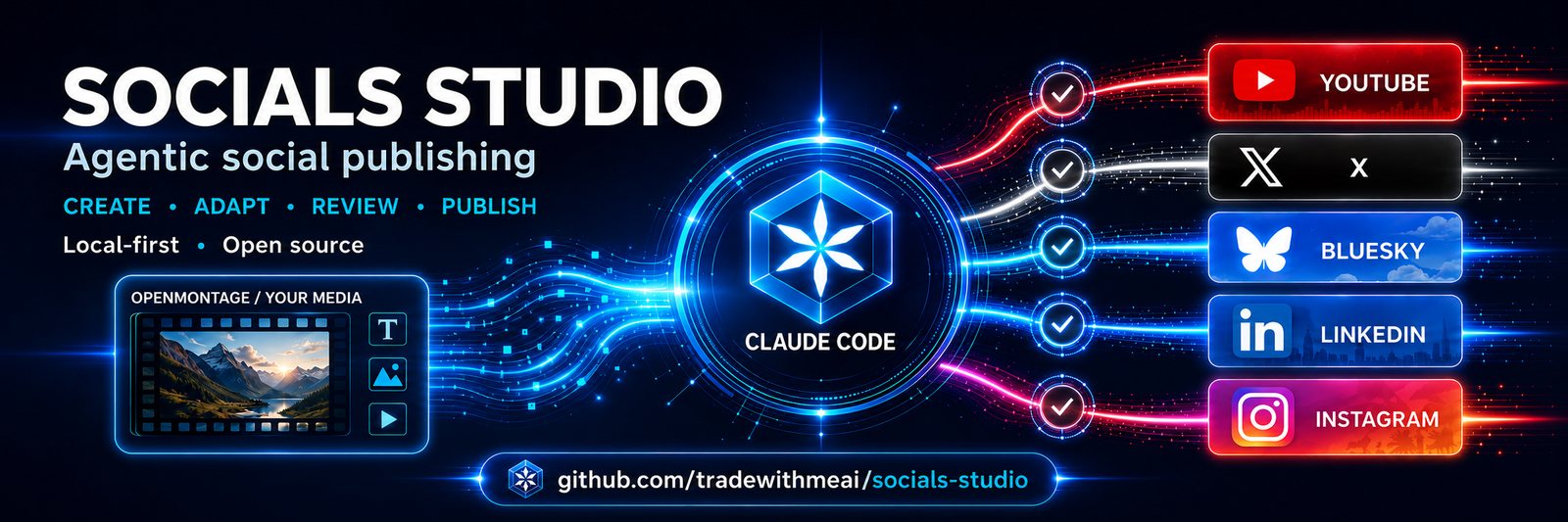
This is file-based compatibility: Socials Studio does not depend on OpenMontage code and is not an official integration. It is an independent community project, not affiliated with, maintained by or endorsed by OpenMontage.
Control
--confirm-publish (or confirm_publish=True); --dry-run always wins if both are passed. Every result reports a dry_run field and a plain-language message stating whether anything was actually published. See SECURITY.md and PRIVACY.md.Open source
Socials Studio is MIT licensed and built to be extended. Whether you write code or drive an agent, you can shape it:
You do not have to write the code yourself. Describe the platform or workflow to your agent, let it prepare the change, then review and test the result before contributing it.
Prefer to talk it through first? Join GitHub Discussions.
Roadmap
An OpenCode-ready version is currently being tested. The aim is to let you operate Socials Studio through an open-source agent and choose from multiple model providers. This is being tested and is not yet the primary supported setup. opencode.ai →
Approved campaigns will be able to publish on a schedule without requiring you to stay in a live session. Campaign content, destinations and timing will still require review and approval.
New platforms will be added according to contributor interest, testing access and the reliability of available publishing methods.
For developers
Simple skills plus a Python publishing layer. Playwright drives a real Chrome build for the browser platforms; YouTube uses the official OAuth Data API. Tested primarily with Claude Code.
Socials Studio is open source and available now. Clone it, run Claude Code and tell it what you want to publish.
Public beta · MIT licensed · five publishing platforms · human approval before publication